
Lighting Audit Software for Commercial LED Retrofits
LumaQuote is lighting audit software for contractors and retrofit teams. Count fixtures on site with the iPad app, then turn the audit into energy savings, rebates, installation costs and a client-ready proposal. No rebuilding the project in spreadsheets.
No credit card required · US and Canada utility rates built in
45 Built-in fixture types,
plus your own
15+ Regions with built-in
utility rates
81 Fields in the
full data export
3 Free proposals,
no credit card
What is lighting audit software?
The fastest path from fixture count to finished proposal.
A commercial lighting audit documents every existing fixture in a facility: type, wattage, quantity, location, operating hours and how each space is controlled. Done by hand, that means a clipboard on site, an Excel file back at the office and a Word proposal assembled from scratch, with the same numbers typed three times.
LumaQuote replaces the whole chain. Walk the building with the field app, even with no signal. Energy use, annual cost and savings calculate as you go. When you are back at your desk, the audit is waiting in LumaQuote, ready to price.
The old way
Clipboard count on site
Retype into Excel
Build the savings formulas
Format a Word proposal
Same numbers typed 3 times
With LumaQuote
Count fixtures on the tablet or phone
kWh/yr calculates live
Pick the LED replacement
Export PDF or Word
Entered once, used everywhere
Audit workflow
How the audit tab works.
Everything you need to capture on site. Nothing you don't.
▾ Warehouse Floor 34 fixtures · 16,748 kWh/yr · 277 V
Hours · Voltage · More
Type · W · Qty · Hours · kWh/yr · $/yr
1 Metal Halide 400W 458 × 6 12h × 260d 8,574 kWh · $1,115/yr ···
2 T8 4ft 2-Lamp 72 × 24 10h × 260d 4,493 kWh · $584/yr ···
3 HPS 250W 295 × 4 12h × 260d 3,682 kWh · $479/yr ···
+ Add Fixture
45 fixture types built in
T8, T12, T5, T5HO, metal halide, HPS, CFL, halogen and incandescent, plus wall packs, vapor tights, shoeboxes, floods, recessed cans and exit signs. Add a custom fixture when you need one.
Live kWh and cost
Enter watts, quantity and hours, and the annual energy use and cost calculate instantly. No formulas to build, no cells to drag.
Areas and spaces
Group the building by floor, wing or building, then by space: warehouse floor, open offices, parking lot. Each space shows its fixture count and kWh/yr.
Hours for a whole space
Pick a schedule once and every fixture in the space follows it. A warehouse with 40 fixture lines takes one tap, not 40 inputs. Any line can still keep its own hours.
Controls, room by room
Note the existing controls in each space and the controls to add, with quantities. Useful anywhere the code asks for it, such as New York.
Floor area, ceiling, color temp
Square footage and ceiling height per space, plus mount height, ceiling type and color temperature per fixture line, so the LED you pick matches what is there.
Photos on every line
Fixture, nameplate and ceiling photos stay with the right space and fixture. Download them all as one ZIP, in folders named by space and fixture.
Condition and scope
Flag condition (good, fair, poor) and scope: in scope, leave as-is, excluded, emergency only or damaged. Excluded fixtures stay in the record and show in the proposal with a note.
Full data export
One CSV with every audit, retrofit, controls, rebate and installation field, one row per fixture line. Ready for your own spreadsheets, scripts or reporting tools.
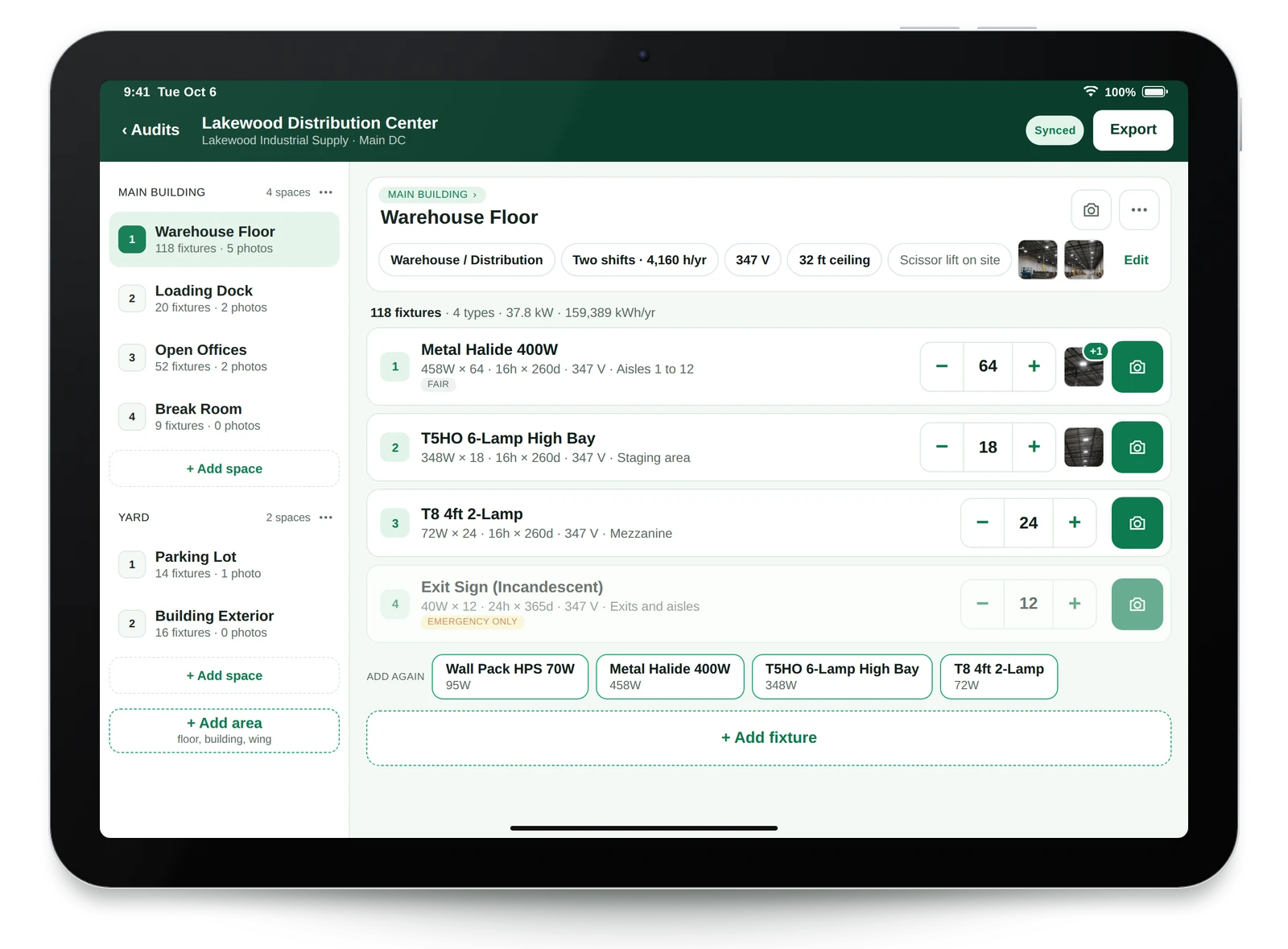
On site
Audit on iPad, iPhone or Android. No signal needed.
LumaQuote Field is the iPad, iPhone and Android app for the walk-through, included on every plan. Basements, parking garages and mechanical rooms rarely have a connection, and the app does not need one.
- Saves on the device first. The audit uploads on its own when you are back online.
- Large buttons for the field. Plus and minus for quantities, one tap for controls and color temperature.
- Ready at the desk. The audit appears in LumaQuote with its photos and notes, ready for the retrofit.
See the lighting audit app → iPad and iPhone app guide → Android app guide →
US + Canada support
Pick your region. Rates fill in.
LumaQuote includes built-in utility rates, CO₂ factors, demand charges and rebate program names for major US regions and every Canadian province. No looking up rates mid-proposal, and every value stays editable for a specific client.
Northeast US · $0.22/kWh · California · $0.27/kWh · Texas · $0.12/kWh · Midwest · Southeast · Southwest · West · Ontario · $0.13/kWh · Quebec · $0.076/kWh · BC · $0.098/kWh · Alberta · $0.17/kWh · Manitoba · Saskatchewan · Nova Scotia · New Brunswick
Ontario · filled in on selection
Utility rate $0.13/kWh
Demand charge $0/kW/mo
CO₂ factor 0.03 kg/kWh
Rebate program Save on Energy
How we compare
LumaQuote vs the alternatives.
Feature LumaQuote SnapCount Lighting Assessor
Field app · iPad, iPhone and Android, works offline · Yes · iOS and Android
Live kWh/yr per fixture · ✓ · ✓ · ✓
Controls per space (existing and to add) ✓ Not documented Not documented
Controls savings layer · ✓ Separate tab · Bundled · Not documented
PDF proposal · ✓ · ✓ · ✓
Word (.docx) proposal · ✓ · Not documented · No, PDF only
US and Canada utility rates · ✓ Built in · Not documented · Limited in Canada
Start on your own · ✓ Free plan · Demo first · ✓ Free app, 2 quotes
Published price · Free, then $99/mo or $899/yr · Not published · $1,299/yr
Competitor details are from each vendor's own website, checked July 2026. For five tools side by side, see the lighting audit software comparison.
Common questions
Lighting audit software FAQ.
What is lighting audit software?
Lighting audit software helps electrical contractors, energy consultants and lighting distributors document existing fixtures during a site walk. It records fixture type, wattage, quantity and operating hours, then calculates energy use (kWh) and annual cost automatically. LumaQuote connects the audit directly to the retrofit proposal, so nothing is retyped into spreadsheets.
Can I use LumaQuote on site during the audit?
Yes. LumaQuote Field is an iPad, iPhone and Android app for the site walk: add areas and spaces, count fixtures, note controls and take photos. It works with no Wi-Fi or cell service and syncs when you are back online. The audit then opens in LumaQuote on your computer, ready to price. You can also audit straight in the browser on a laptop or tablet.
What fixture types does LumaQuote support?
LumaQuote has 45 built-in fixture types: T8 (1 to 4 lamps, 2 ft, 4 ft and 8 ft), T12, T5, T5HO, metal halide (70W to 1000W), HPS (70W to 400W), CFL, incandescent, halogen, vapor tights, wall packs, shoeboxes, floods, recessed cans and exit signs. You can add a custom fixture when you find something unusual.
Can I record lighting controls in the audit?
Yes. For each space you note the existing controls (wall switch, dimmer, occupancy, vacancy or daylight sensor, timer, photocell, lighting panel) and the controls to add, with a quantity for each type. That record is separate from the controls savings analysis, which stays optional.
Does the audit data feed into the proposal automatically?
Yes. Every fixture in the Audit tab carries forward to Retrofit, Controls, Rebates, Installation and Summary. You never re-enter data, and the proposal reflects exactly what you audited, including excluded fixtures and notes.
Can I export the audit data?
Yes. The Full Data Export is one CSV file with every audit, retrofit, controls, rebate and installation field, one row per fixture line, with fixed column names so other software can read it. Site photos download as one ZIP in folders by space and fixture.
Does LumaQuote work for US and Canadian lighting audits?
Yes. Utility rates are built in for major US regions and every Canadian province. Pick the region and the rate, CO2 factor, demand charge and rebate program name fill in. Every value stays editable for a specific client.
How does LumaQuote compare to SnapCount or Lighting Assessor?
SnapCount is an enterprise platform with purchasing and installation operations, sold through a demo. Lighting Assessor is a mobile app with a published yearly price and PDF output. LumaQuote is self-serve with a Free plan, an offline iPad, iPhone and Android app, PDF and Word proposals, a separate controls layer and built-in US and Canadian utility rates. See the full lighting audit software comparison.
⚡ LumaQuote
Your next lighting audit
starts here.
From fixture count to finished proposal, in one tool. Start on the Free plan and audit your next building on the tablet or phone.
Start Free See the Platform → Full Feature List →
Free plan: 3 proposals, no credit card · Pro: $99/mo or $899/yr · iPad, iPhone and Android app on every plan
Already a customer? Log In →
More: Sample proposal · Local Law 88 room checklist · Compare lighting audit software